info@kynix.com
 00852-6915 1330


 0
0


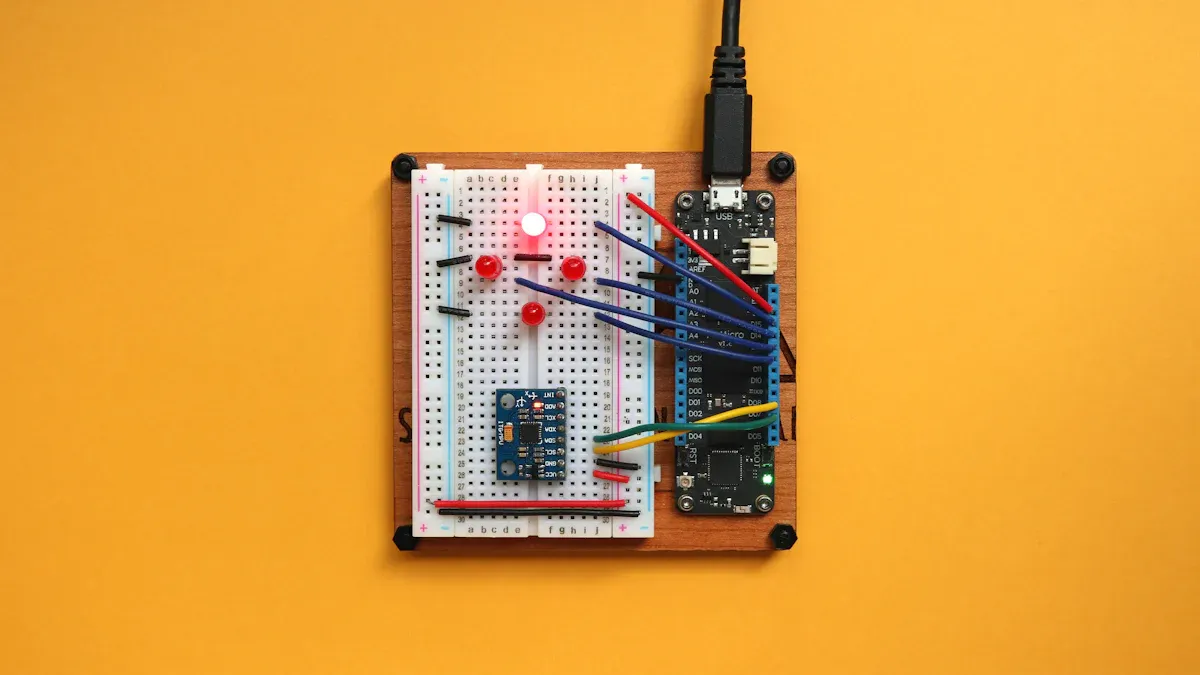
You can learn how to control a motor using simple tools and basic parts. This arduino tutorial guides you through building a motor driver circuit with arduino. Many beginners enjoy hands-on electronics projects like this because they make learning fun and practical. When you build a motor driver, you get to see how motor drivers work and how a motor responds to your code. Projects like this arduino project help you gain real skills and let you explore new ideas.Motor Drivers OverviewWhat Are Motor DriversYou use motor drivers to control the flow of electricity to a motor. These devices act as a bridge between your microcontroller and the motor. Microcontrollers, like Arduino, cannot supply enough current or voltage to run a motor directly. Motor drivers solve this problem by taking low-power signals from your microcontroller and switching higher currents to the motor.Motor drivers come in many forms. The most common type is the h-bridge. An h-bridge lets you control the direction and speed of a DC motor. You can make the motor spin forward, backward, or stop. The h-bridge design uses four switches, which you turn on or off in pairs. This setup gives you full control over the motor’s movement.Did you know? The electric motor market is huge. In 2024, it is worth about $166 billion and keeps growing. This growth comes from industries like manufacturing, electric vehicles, and consumer electronics. Motor drivers play a key role in these areas, making them important in many electronics projects.Here are some technical terms you may see when learning about motor drivers:ParameterDefinitionUnitsTorque constant (kM)Shows how much torque you get for each amp of current.mNm/ASpeed constant (kn)Tells you how fast the motor spins for each volt you apply.rpm/VBack EMF constant (kG)Relates the voltage produced by the spinning motor to its speed.V/rpmTerminal inductance (L)Measures how the motor windings resist changes in current.mHWhy Use a Motor DriverYou need a motor driver when you want to control a DC motor with a microcontroller. Microcontrollers cannot handle the high current needed for dc motor control. Motor drivers, especially h-bridge circuits, allow you to safely and efficiently manage this current.H-bridge motor drivers let you:Change the direction of the motor.Adjust the speed using pulse-width modulation (PWM).Stop the motor quickly or let it coast.H-bridge dc motor control is popular because it works well for many projects, from robots to fans.In real-world projects, h-bridge motor drivers help you build systems that are easy to test and maintain. For example, in cars, h-bridge circuits control seat adjustments. They work with sensors and communication systems to make movements smooth and safe.Using motor drivers in your projects gives you:More control over dc motor control.Protection for your microcontroller.The ability to add features like overcurrent protection and diagnostics.You will find that motor drivers make your electronics projects more reliable and flexible. As you learn to use h-bridge circuits, you open the door to advanced robotics and automation.Components and ToolsImage Source: unsplashParts List for Motor DriverYou need a few basic parts to build your motor driver project. Here is a list of what you should gather before you start:Arduino board (Uno or similar)Breadboard2N2222 transistor1N4001 diode220 ohm resistor0.1uF capacitorDC motor9V batteryTip: You can find these parts in most beginner electronics kits. Using a breadboard helps you test your circuit before making it permanent.Component FunctionsEach part in your motor driver circuit has a special job. Understanding these roles helps you build and troubleshoot your project.ComponentFunctionArduinoSends control signals to turn the motor on or off.BreadboardLets you connect parts without soldering.2N2222 transistorActs as a switch to control the current flowing to the dc motor.1N4001 diodeProtects your circuit from voltage spikes when the motor turns off.220 ohm resistorLimits the current going into the transistor’s base from the Arduino.0.1uF capacitorReduces electrical noise and smooths out voltage changes.DC motorConverts electrical energy into motion.9V batterySupplies power to the motor and the circuit.When you connect the battery, chemical energy changes into electrical energy. The current flows through the complete circuit path, making the dc motor spin. The Arduino sends a signal to the transistor, which then lets current reach the motor. The diode keeps your components safe by blocking sudden voltage spikes. The resistor and capacitor help control and stabilize the flow of electricity.You can use a circuit diagram to see how each part connects. Circuit diagrams use symbols to show the layout. This makes it easier to understand and build your project. If you add or remove parts, you change how much current flows. This can affect how fast or strong your motor runs.Hands-on activities like this help you see how each component works together. You learn how batteries in series add up their voltages, and how each part influences the whole circuit.Building the Motor DriverCircuit DiagramYou need a clear circuit diagram before you start building. The diagram shows how each part connects. It helps you avoid mistakes and makes the assembly process easier. In this project, you use a simple h-bridge design to control the motor. The h-bridge lets you change the direction and speed of the motor using a pwm signal from the Arduino.A typical circuit diagram for this project includes:Arduino connected to the base of a 2N2222 transistor through a 220 ohm resistor.The collector of the transistor connects to one terminal of the DC motor.The other terminal of the motor connects to the positive side of the 9V battery.The emitter of the transistor connects to ground.A 1N4001 diode is placed across the motor terminals, with the cathode to the positive side, to protect against voltage spikes.A 0.1uF capacitor is placed near the motor to reduce electrical noise.Note: Engineers use tools like Altium's PDN Analyzer to simulate current paths in the circuit. This helps check if the copper traces and connectors can handle the expected current. The simulation also shows areas that might overheat and suggests ways to improve the design, such as changing resistor values or adding more copper for better heat dissipation. These steps make sure your circuit works safely and reliably.Wiring StepsFollow these steps to assemble your motor driver on a breadboard:Place the Arduino and breadboard on your workspace.Insert the 2N2222 transistor into the breadboard. Make sure you know which pin is the collector, base, and emitter.Connect the base of the transistor to a digital pin on the Arduino (for example, pin 9) using a 220 ohm resistor.Attach the collector of the transistor to one terminal of the DC motor.Connect the other terminal of the motor to the positive terminal of the 9V battery.Connect the emitter of the transistor to the ground rail on the breadboard.Connect the Arduino ground to the breadboard ground rail.Place the 1N4001 diode across the motor terminals. The cathode (marked end) should go to the battery positive side.Add the 0.1uF capacitor across the motor terminals to help reduce noise.Double-check all connections before powering up.You control the motor speed by sending a pwm signal from the Arduino to the transistor base. The pwm signal turns the transistor on and off very quickly. This controls how much current flows through the motor, which changes the motor speed. If you want to reverse the direction, you can use a full h-bridge circuit. For now, this simple setup lets you practice basic motor speed control.Tip: Use short wires and keep your connections neat. This reduces noise and makes troubleshooting easier.Safety TipsYou must follow safety tips when working with any circuit, especially when controlling motor speed with an h-bridge or pwm signal. Proper safety steps protect you and your components.Always check the polarity of your battery and diode. Reversing them can damage the circuit.Never touch the circuit when it is powered. Disconnect the battery before making changes.Use the correct value for the resistor and capacitor. Wrong values can cause overheating or unstable motor speed.Place the diode in the right direction. The cathode should face the positive voltage. This protects your circuit from voltage spikes when the motor stops.Make sure your wires are secure. Loose connections can cause the pwm signal to fail or the h-bridge to malfunction.Automotive safety standards like ISO 26262 and ASIL show why safety matters. These standards cover risk analysis, design, and testing for motor driver circuits. They help prevent hazards like overheating or loss of control. Engineers use these guidelines to design safe circuits for cars and robots. You can follow similar steps to keep your project safe.Safety Function DescriptionSafety Rating StandardKey Components and NotesEmergency Stop using programmable controllers and safety contactorsCategory 3, PLd to EN ISO 13849-1: 2008Compact GuardLogix Controller, POINT Guard I/O Module, Dual-channel E-Stop ButtonAccess and Door Guarding with GuardLogix controller and safety switchesCategory 4, PLe to EN ISO 13849-1: 2015GuardLogix 5570 Controller, ArmorBlock Guard I/O Module, SensaGuard Switch, ArmorStart ST Motor Controller (Safety Version)Programmable Controller with Cable Pull SwitchesCategory 3, PLd to EN ISO 13849-1: 2015GuardLogix Controller, Lifeline Cable Pull Switch, POINT Guard I/O Safety ModulesSafety Relay for Emergency StopCategory 3, PLd to EN ISO 13849-1: 2008800F E-Stop, Guardmaster Single-input Safety Relay, 100S Safety ContactorsRemember: Careful wiring and correct component placement help you avoid common mistakes. Always test your circuit with low power first. If you notice any heat or strange smells, disconnect power right away.You now have the knowledge to build a safe and reliable motor driver. You can control motor speed with a pwm signal and practice using an h-bridge for more advanced projects. This hands-on experience prepares you for bigger challenges in robotics and automation.Arduino and L298N Motor DriverImage Source: unsplashL298N Motor Driver BasicsYou can use the L298N motor driver to control motors in more advanced Arduino projects. This driver works well for dc motor control and arduino robot car control. The L298N motor driver supports up to 46V and 4A, which means you can drive bigger motors than with basic circuits. It uses a dual H-bridge structure, so you can control two motors at the same time. You can change the speed and direction of each motor by sending signals from your Arduino.SpecificationDetailsOperating Voltage RangeUp to 46VMaximum Continuous CurrentUp to 4AMaximum Output Current3A per outputPower Dissipation25WLogic Input CompatibilityTTL-compatibleOver-temperature ProtectionYesThe L298N motor driver uses enable pins for speed control. You send a PWM signal from your Arduino to these pins. The driver also has built-in protection features, such as overheating shutdown and freewheeling diodes. These features help keep your project safe and reliable.Note: The L298N motor driver can control two DC motors or one stepper motor. This makes it a flexible choice for many Arduino robot car control projects.Connecting Arduino and L298NYou connect your Arduino and L298N motor driver using a few simple steps. The most efficient way is to remove the jumper between the enable pin and 5V on the driver. Then, connect the enable pin to a PWM pin on your Arduino. Connect IN1 and IN2 to two digital pins. This setup lets you control the speed and direction of each motor with fewer PWM pins.ENA/ENB pins: Connect to Arduino PWM pins for speed control.IN1, IN2, IN3, IN4: Connect to Arduino digital pins for direction control.Power supply: Use 12V to 35V for stable operation.This method protects your Arduino and gives you full control over dc motor control and arduino robot car control. The L298N motor driver can output up to 2A per channel, which is enough for small and medium motors. If you notice your motors running at different speeds, check your wiring and power supply. Sometimes, small differences in speed can happen due to the motors or the driver.Tip: Always test your setup with different motors or power supplies if you see problems. This helps you find the cause quickly.Stepper Motor Driver OptionYou can also use the L298N motor driver as a stepper motor driver. Stepper motors are popular in robotics because they offer precise movement and high reliability. Microstepping drivers give you smoother motion, which is important for arduino robot car control and other robotics projects. When you use a stepper motor driver, you can adjust the speed and stepping resolution to match your needs.Stepper motor drivers work well for projects that need accurate control, such as 3D printers or robotic arms. They let you set the distance, speed, and accuracy for each move. Many robotics projects use stepper motor drivers because they balance cost, performance, and control.Code and TestingUploading CodeYou can upload arduino code to your board to control motor speed with pwm signals. Start by opening the Arduino IDE on your computer. Connect your Arduino to the computer using a USB cable. Select the correct board and port in the Tools menu. Copy and paste the code below into the IDE. This code uses pwm to control motor speed and direction. You can change the values to test varying speeds.const int motorPin = 9; // PWM pin connected to transistor basevoid setup() { pinMode(motorPin, OUTPUT);}void loop() { analogWrite(motorPin, 128); // Set motor speed to half (128 out of 255) delay(2000); // Run for 2 seconds analogWrite(motorPin, 255); // Set motor speed to full delay(2000); // Run for 2 seconds analogWrite(motorPin, 0); // Stop motor delay(2000); // Pause for 2 seconds}Efficient coding practices help you get reliable results. Use modular functions for direction and speed control. Debounce button inputs with short delays to avoid signal jitter. The table below shows how you can use digital pins and pwm for h-bridge dc motor control and pwm dc motor control.Motor Control FunctionDirection Pin (Left Motor)Speed Pin (Left Motor, PWM)Direction Pin (Right Motor)Speed Pin (Right Motor, PWM)ForwardLOW (D4)200 (D6)LOW (D2)200 (D5)BackwardHIGH (D4)50 (D6)HIGH (D2)50 (D5)Turn LeftHIGH (D4)200 (D6)LOW (D2)200 (D5)Turn RightLOW (D4)200 (D6)HIGH (D2)200 (D5)StopLOW (D4)0 (D6)LOW (D2)0 (D5)You can see how pwm signal values change for different actions in this chart:Image Source: statics.mylandingpages.coTesting the Motor DriverAfter uploading the arduino code, test your circuit. Watch the motor as it runs at different speeds. The pwm signal controls how fast the motor spins. You should see the motor speed change every two seconds. If you use an h-bridge, you can also test direction changes. Use the serial monitor to check if the Arduino receives the right signals. When you press buttons or send commands, the motor should respond right away.Test codes on Arduino Nano boards show that you can control motor speed and direction. You can rotate servo arms to different angles or make the motor move forward, backward, left, or right. The serial monitor helps you confirm that the pwm signal and arduino code work as expected.TroubleshootingIf your motor does not spin or the speed does not change, follow these steps:Check all wiring and connections for loose or incorrect placement.Make sure the battery has enough voltage for the motor.Use a multimeter to check for voltage at the motor terminals.Inspect the transistor and diode for correct orientation.Look for error messages in the Arduino IDE.Use built-in diagnostic tools to monitor pwm signal and motor speed.Observe the motor for unusual sounds, vibrations, or heat.Review your arduino code for mistakes in pwm or direction control.Document any error codes or strange behavior.Consult the motor driver manual or seek help if needed.Manufacturers often provide fault codes for motor drivers. These codes help you find problems like internal faults, power issues, or motor load errors. You can use software tools to read these codes and compare them with normal operation. This process helps you fix issues quickly and keep your project running smoothly.Tip: Always test your circuit at low speed first. If you notice overheating or odd smells, disconnect power and check your setup.You followed this tutorial to build and test a basic motor driver. You learned how to connect parts, upload code, and check your results. Try using different sensors or adding lights to make your project unique. You can also use other types of motors for new challenges.Share your results or ask questions in the comments. Your feedback helps others learn from this tutorial.FAQHow do you know if your motor driver circuit works?You should see the motor spin when you upload the code. If the speed changes as expected, your circuit works. If nothing happens, check your wiring and power.Can you use a different transistor instead of 2N2222?Yes, you can use other NPN transistors like BC547 or 2N3904. Make sure the transistor can handle the current your motor needs.Why does the diode go across the motor?The diode protects your circuit from voltage spikes. When you turn off the motor, it can send a sudden voltage back. The diode blocks this and keeps your parts safe.What should you do if the motor gets hot?Unplug the power right away. Check if your motor draws too much current. Use a lower voltage or a bigger motor driver if needed.
On 2025-07-10